3.3. Joint Effort for Data Assimilation Integration (JEDI) DA System
This chapter describes the Data Assimilation (DA) system for Land DA, which utilizes the UFS WM Noah-MP component together with the jedi-bundle to enable cycled model forecasts. The data assimilation framework applies either the letkf-oi algorithm or the 3dvar algorithm. The Local Ensemble Transform Kalman Filter-Optimal Interpolation (LETKF-OI) algorithm uses pseudo-ensemble error covariance; it combines the state-dependent background error derived from an ensemble forecast with the observations and their corresponding uncertainties to produce an analysis ensemble (Hunt et al. [HEJKS07], 2007). The 3-D Variational (3D-Var) DA algorithm attempts to find the analysis that best represents the true state of the atmosphere by minimizing a cost function given a particular background (previous forecast) and observations.
3.3.1. JEDI Overview
Attention
Users are encouraged to visit the JEDI Documentation. Much of the information in this chapter is drawn directly from there with modifications to clarify JEDI’s use specifically in the context of the Land DA System.
The Joint Effort for Data assimilation Integration (JEDI) is a unified and versatile data assimilation (DA) system for Earth system prediction that can be run on a variety of platforms. JEDI is developed by the Joint Center for Satellite Data Assimilation (JCSDA) and partner agencies, including NOAA. It includes several components:
The Object-Oriented Prediction System (OOPS) for the data assimilation algorithm
The Interface for Observation Data Access (IODA) for the observation formatting and processing
The Unified Forward Operator (UFO) for comparing model forecasts and observations
The System Agnostic Background Error Representation (SABER) for computing and manipulating the background error covariance matrix
The VAriable DErivation Repository (VADER) for producing new variables from known variables
3.3.2. JEDI Configuration Builder (JCB) Overview
The JEDI Configuration Builder (JCB) is a tool that facilitates the use of JEDI DA in NWP workflows. The JCB ecosystem currently consists of three repositories: JCB, JCB-algorithms, and JCB-gdas. Figure 3.2 shows how the repositories relate to each other. The main JCB repository collects templates from the other two repositories to assemble a final YAML file that follows JEDI conventions. The JCB-algorithms repository contains subtemplates for the actual JEDI algorithms (e.g., LETKF or 3D-Var). The JCB-gdas repository contains subtemplates for assimilating particular types of data (e.g., snow, marine). The YAML files that control JEDI functionality can be extremely complex, but JCB simplifies the process of creating a valid JEDI configuration file.
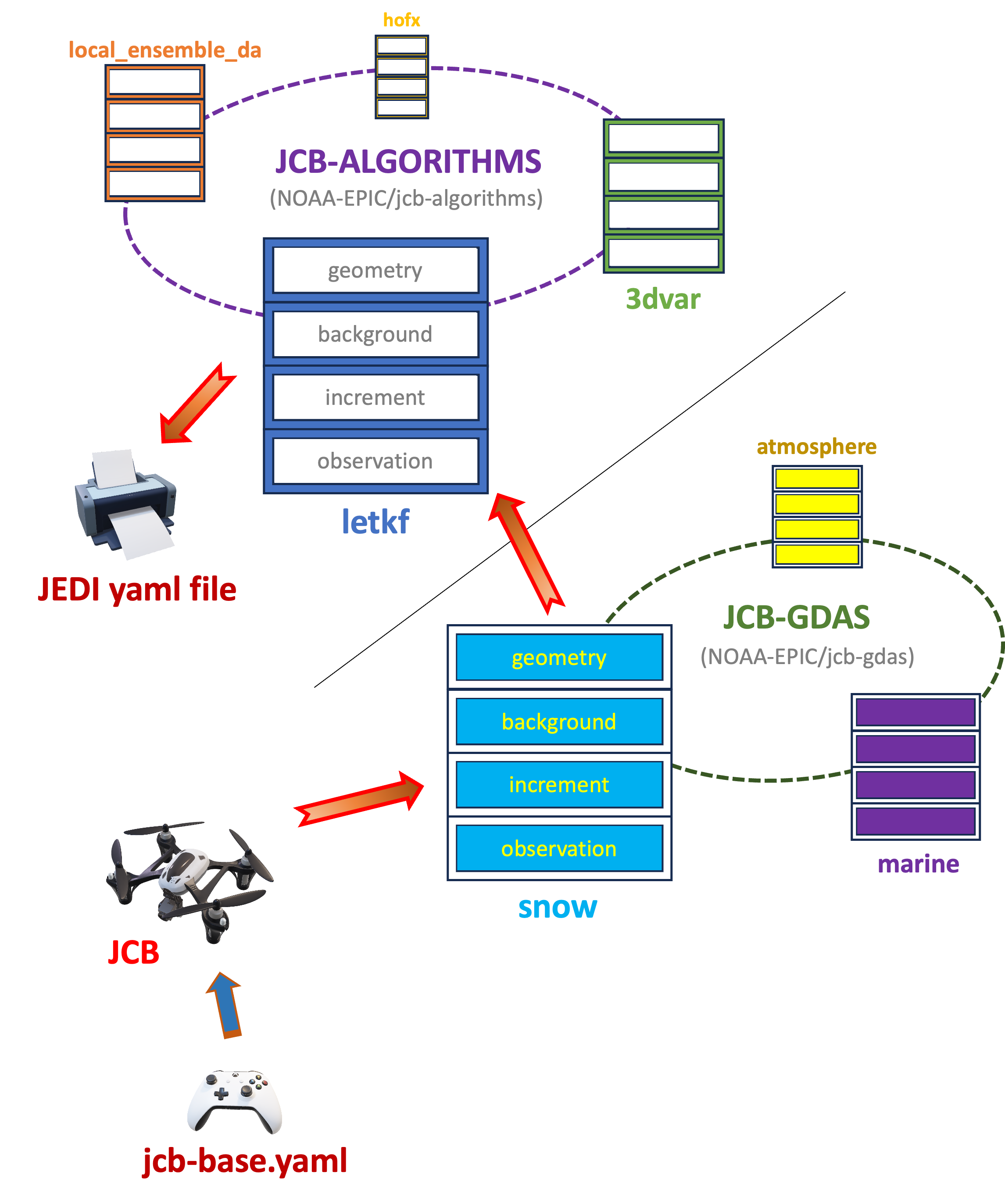
Fig. 3.2 Flow Diagram of JCB
Concretely, repositories that implement JCB interact with the main JCB code via a JCB input file. In the Land DA repository, this file is called jcb-base_<DA_type>.yaml, and it is built using the JCB template file parm/jedi/jcb-base_land.yaml.j2. When users run parm/setup_wflow_env.py to set up the workflow, jcb-base_<DA_type>.yaml is produced by rendering jcb-base_land.yaml.j2 using values from the user’s config.yaml file. JCB uses this jcb-base_<DA_type>.yaml file to assemble the proper subtemplates from the JCB-algorithms and JCB-gdas repositories into the final JEDI DA workflow file. Note that JCB can generate a JEDI input configuration YAML file only when CUSTOM_JEDI_CONFIG_FLAG is set to NO in the configuration file.
3.3.2.1. JCB Components
Table 3.6 lists the three repositories in the JCB ecosystem.
Component |
Authoritative Repository Link |
NOAA-EPIC Fork (if applicable) |
|---|---|---|
JCB |
N/A |
|
JCB-algorithms |
||
JCB-gdas |
Note
The authoritative EMC JCB-gdas repository contains four categories for analysis models: aero, atmosphere, marine, and snow. However, the EPIC fork of JCB-gdas has one more category—land—that contains subcomponent files not only for snow analysis but also for soil-moisture analysis.
3.3.3. JEDI Configuration Files & Parameters in the Land DA System
The Land DA System uses the JEDI Configuration Builder (JCB) along with parameters defined in the land_analysis.xml file to interface with the JEDI DA system. As described in Section 3.1, the Land DA workflow generates a land_analysis.yaml file that contains all settings required for an experiment — user-selected settings from config.yaml, default values, and machine-dependent settings. From this YAML file, the land_analysis.xml Rocoto workflow file is generated.
In the workflow, the first workflow tasks to run are:
The jcb task generates JEDI configuration YAML files using JCB and information provided in the land_analysis.xml file (e.g., DA algorithm, cycle dates). The template file jcb-base_land.yaml.j2 is filled in using information from land_analysis.xml during the jcb task. This produces the jcb-base_<DA_type>.yaml file, which points to files containing information on geometry, time window, background, driver, local ensemble DA, and/or output increment. <DA_type> is either snow or soil_moisture. This information is used as input to create a YAML file (jedi_<algorithm>_<DA_type>.yaml, where <algorithm> is letkf-oi or 3dvar) containing detailed algorithm-specific information. These two files (jcb-base_<DA_type>.yaml and jedi_<algorithm>_<DA_type>.yaml) form the basis of the DA system configuration in the Land DA System.
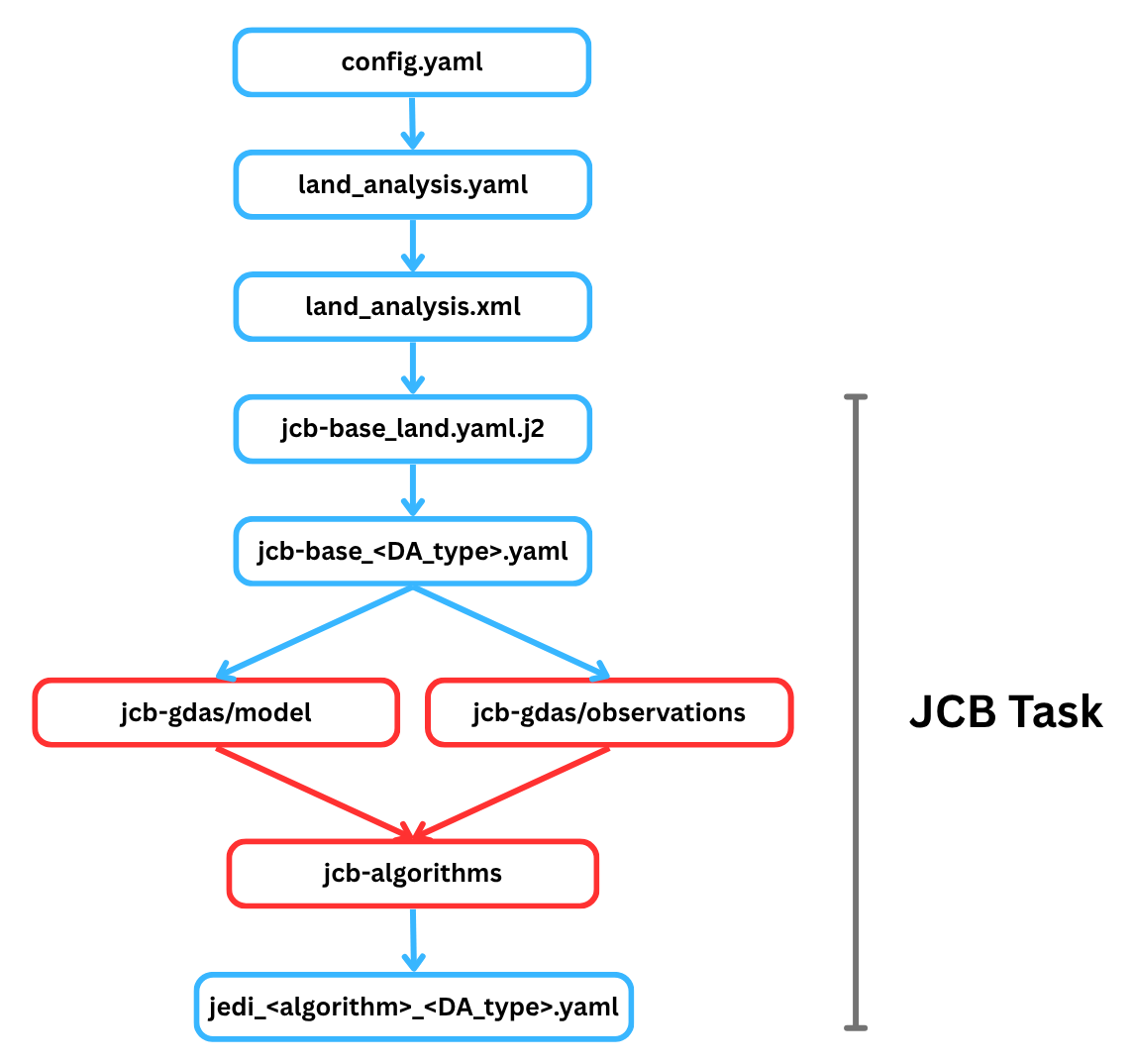
Fig. 3.3 Outline of the JCB Task
The jcb task stores these files in the ptmp/<envir>/tmp/jcb.${PDY}${cyc}.${jobid}/ directory, where ${PDY}${cyc} is in YYYYMMDDHH format (see Section 3.1.3.1), and the ${jobid} is the job ID assigned by the system. Users can also access this file via the tmp_dir/jcb.${PDY}${cyc}.${jobid} shortcut in their experiment directory. The example below shows what the complete jcb-base_snow.yaml file might look like for the 2025-01-19 00Z cycle.
# JCB general
JEDI_ALGORITHM: "3dvar"
inc_fn_prefix: "snowinc"
snowdepth_vn: "snwdph"
algorithm: 3dvar
algorithm_path: "/home/ubuntu/landda/land-DA_workflow/parm/jedi/jcb-algorithms"
app_path_algorithm: "/home/ubuntu/landda/land-DA_workflow/parm/jedi/jcb-gdas/algorithm/land"
app_path_model: "/home/ubuntu/landda/land-DA_workflow/parm/jedi/jcb-gdas/model/land"
app_path_observations: "/home/ubuntu/landda/land-DA_workflow/parm/jedi/jcb-gdas/observations/land"
app_path_observation_chronicle: "/home/ubuntu/landda/land-DA_workflow/parm/jedi/jcb-gdas/observation_chronicle/land"

# Template file name for each section (if not defined, default files in jcb-algorithms will be used)
geometry_background_file: land_geometry_background
background_file: snow_background
background_error_file: snow_background_error
final_increment_file: snow_final_increment_fms

# Time window
window_begin: "2025-01-18T12:00:00Z"
window_length: "PT24H"

# Geometry
land_fv3jedi_files_path: "Data/fv3files"
land_layout_x: 1
land_layout_y: 1
land_npx_anl: 97
land_npy_anl: 97
land_npz_anl: 127
land_npx_ges: 97
land_npy_ges: 97
land_npz_ges: 127
land_orog_files_path: "/home/ubuntu/landda/land-DA_workflow/fix/FV3_fix_tiled/C96"
land_orog_prefix: "C96"

# Final/minimization
analysis_variables: [totalSnowDepth]
final_diagnostics_departures: anlmob
land_final_inc_file_path: "./"
minimizer: DRPCG
number_of_outer_loops: 1

# Local Ensemble DA
local_ensemble_da_solver: "3DVAR"
inflation_rtps: "0.0"
inflation_rtpp: "0.0"
inflation_mult: "1.0"

# Driver
driver_do_test_prints: False
driver_update_obs_config_with_geometry_info: False
driver_save_posterior_mean: False
driver_save_posterior_ensemble: False
driver_save_posterior_mean_increment: True
driver_do_posterior_observer: False

# Background
land_background_path: "bkg"
land_background_time_fv3: "20250119.000000"
land_background_time_iso: "2025-01-19T00:00:00Z"
land_increment_time_fv3: "20250119.000000"
land_increment_time_iso: "2025-01-19T00:00:00Z"

# Background error
land_bump_data_directory: "berror"

# Observation
observations:
- ims_snow
- sfcsno
#- snocvr_snow

land_obsdatain_path: "obs"
land_obsdatain_prefix: "obs.20250119.t00z."
land_obsdataout_path: "diags"
land_obsdataout_prefix: "diag."
land_obsdataout_suffix: "_2025011900.nc"
The example below shows what the complete jedi_<algorithm>_<DA_type>.yaml file might look like for the 2025-01-19 00Z cycle using the 3dvar option for snow DA. Concretely, this file would be named jedi_3dvar_snow.yaml.
cost function:
  cost type: 3D-Var
  jb evaluation: false
  time window:
    begin: '2025-01-18T12:00:00Z'
    length: PT24H
    bound to include: begin
  geometry:
    fms initialization:
      namelist filename: Data/fv3files/fmsmpp.nml
      field table filename: Data/fv3files/field_table
    akbk: Data/fv3files/akbk.nc4
    layout:
    - 1
    - 1
    npx: 97
    npy: 97
    npz: 127
    field metadata override: Data/fv3files/fv3jedi_fieldmetadata_restart.yaml
  analysis variables:
  - totalSnowDepth
  background:
    datapath: bkg
    filetype: fms restart
    skip coupler file: true
    datetime: '2025-01-19T00:00:00Z'
    state variables:
    - totalSnowDepth
    - vtype
    - slmsk
    - sheleg
    - filtered_orography
    field io names:
      totalSnowDepth: snwdph
      filtered_orography: orog_filt
    filename_sfcd: 20250119.000000.sfc_data.nc
    filename_cplr: 20250119.000000.coupler.res
    filename_orog: C96_oro_data.nc
  background error:
    covariance model: SABER
    saber central block:
      saber block name: BUMP_NICAS
      read:
        general:
          universe length-scale: 300000.0
        drivers:
          multivariate strategy: univariate
          read global nicas: true
        nicas:
          explicit length-scales: true
          horizontal length-scale:
          - groups:
            - totalSnowDepth_shadowLevels
            value: 250000.0
          vertical length-scale:
          - groups:
            - totalSnowDepth_shadowLevels
            value: 0.0
          interpolation type:
          - groups:
            - totalSnowDepth_shadowLevels
            type: c0
          same horizontal convolution: true
        io:
          data directory: berror
          files prefix: snow_bump_nicas_250km_shadowlevels
    saber outer blocks:
    - saber block name: ShadowLevels
      fields metadata:
        totalSnowDepth:
          vert_coord: filtered_orography
      calibration:
        number of shadow levels: 50
        lowest shadow level: -450.0
        highest shadow level: 8850.0
        vertical length-scale: 2000.0
    - saber block name: BUMP_StdDev
      read:
        drivers:
          compute variance: true
        variance:
          explicit stddev: true
          stddev:
          - variables:
            - totalSnowDepth
            value: 30.0
  observations:
    obs perturbations: false
    observers:
    - obs space:
        name: ims_snow
        obsdatain:
          engine:
            type: H5File
            obsfile: obs/obs.20250119.t00z.ims_snow.tm00.nc
            missing file action: warn
        obsdataout:
          engine:
            type: H5File
            obsfile: diags/diag.ims_snow_2025011900.nc
        simulated variables:
        - totalSnowDepth
      obs operator:
        name: Identity
      obs pre filters:
      - filter: Perform Action
        filter variables:
        - name: totalSnowDepth
        action:
          name: assign error
          error parameter: 80.0
      obs prior filters:
      - filter: Domain Check
        where:
        - variable:
            name: GeoVaLs/slmsk
          minvalue: 0.5
          maxvalue: 1.5
      - filter: RejectList
        where:
        - variable:
            name: GeoVaLs/vtype
          minvalue: 14.5
          maxvalue: 15.5
      obs post filters:
      - filter: Background Check
        filter variables:
        - name: totalSnowDepth
        threshold: 3.0
        action:
          name: reject
      - filter: Gaussian Thinning
        horizontal_mesh: 40.0
      - filter: Bounds Check
        filter variables:
        - name: totalSnowDepth
        minvalue: 0.0
    - obs space:
        name: sfcsno
        obsdatain:
          engine:
            type: bufr
            obsfile: obs/obs.20250119.t00z.sfcsno.tm00.bufr_d
            mapping file: obs/bufr_sfcsno_mapping.yaml
            missing file action: warn
        obsdataout:
          engine:
            type: H5File
            obsfile: diags/diag.sfcsno_2025011900.nc
        simulated variables:
        - totalSnowDepth
      obs operator:
        name: Composite
        components:
        - name: Identity
        - name: BackgroundErrorIdentity
      linear obs operator:
        name: Identity
      obs pre filters:
      - filter: Create Diagnostic Flags
        flags:
        - name: missing_snowdepth
          initial value: false
        - name: missing_elevation
          initial value: false
        - name: temporal_thinning
          initial value: false
        - name: invalid_snowdepth
          initial value: false
        - name: invalid_elevation
          initial value: false
        - name: land_check
          initial value: false
        - name: landice_check
          initial value: false
        - name: elevation_bkgdiff
          initial value: false
        - name: rejectlist
          initial value: false
        - name: background_check
          initial value: false
        - name: buddy_check
          initial value: false
      - filter: Perform Action
        filter variables:
        - name: totalSnowDepth
        action:
          name: assign error
          error parameter: 40.0
      - filter: Variable Assignment
        assignments:
        - name: GrossErrorProbability/totalSnowDepth
          type: float
          value: 0.02
        - name: BkgError/totalSnowDepth_background_error
          type: float
          value: 30.0
      - filter: Domain Check
        where:
        - variable:
            name: ObsValue/totalSnowDepth
          value: is_valid
        actions:
        - name: set
          flag: missing_snowdepth
          ignore: rejected observations
        - name: reject
      - filter: Domain Check
        where:
        - variable:
            name: MetaData/stationElevation
          value: is_valid
        actions:
        - name: set
          flag: missing_elevation
          ignore: rejected observations
        - name: reject
      - filter: Temporal Thinning
        min_spacing: PT24H
        seed_time: '2025-01-19T00:00:00Z'
        category_variable:
          name: MetaData/stationIdentification
        actions:
        - name: set
          flag: temporal_thinning
          ignore: rejected observations
        - name: reject
      obs prior filters:
      - filter: Bounds Check
        filter variables:
        - name: totalSnowDepth
        minvalue: 0.0
        maxvalue: 20000.0
        actions:
        - name: set
          flag: invalid_snowdepth
          ignore: rejected observations
        - name: reject
      - filter: Domain Check
        where:
        - variable:
            name: GeoVaLs/slmsk
          minvalue: 0.5
          maxvalue: 1.5
        actions:
        - name: set
          flag: land_check
          ignore: rejected observations
        - name: reject
      - filter: Domain Check
        where:
        - variable:
            name: MetaData/stationElevation
          minvalue: -200.0
          maxvalue: 9900.0
        actions:
        - name: set
          flag: invalid_elevation
          ignore: rejected observations
        - name: reject
      - filter: RejectList
        where:
        - variable:
            name: GeoVaLs/vtype
          minvalue: 14.5
          maxvalue: 15.5
        actions:
        - name: set
          flag: landice_check
          ignore: rejected observations
        - name: reject
      - filter: Difference Check
        reference: MetaData/stationElevation
        value: GeoVaLs/filtered_orography
        threshold: 200.0
        actions:
        - name: set
          flag: elevation_bkgdiff
          ignore: rejected observations
        - name: reject
      - filter: BlackList
        where:
        - variable:
            name: MetaData/stationIdentification
          is_in:
          - 71621
          - 10863
          - 16179
          - 40550
          - 40580
          - 40582
          - 40587
          - 40592
          - 47005
          - 47008
          - 47014
          - 47016
          - 47020
          - 47022
          - 47025
          - 47028
          - 47031
          - 47035
          - 47037
          - 47039
          - 47041
          - 47046
          - 47050
          - 47052
          - 47055
          - 47058
          - 47060
          - 47061
          - 47065
          - 47067
          - 47068
          - 47069
          - 47070
          - 47069
          - 47070
          - 47075
          - 47090
          - 48698
          - 48830
          - 65250
          - 47095
          - 47098
          - 47101
          - 47102
        actions:
        - name: set
          flag: rejectlist
          ignore: rejected observations
        - name: reject
      obs post filters:
      - filter: Background Check
        filter variables:
        - name: totalSnowDepth
        threshold: 6.25
        actions:
        - name: set
          flag: background_check
          ignore: rejected observations
        - name: reject
      - filter: Met Office Buddy Check
        filter variables:
        - name: totalSnowDepth
          rejection_threshold: 0.5
          traced_boxes:
            min_latitude: -90
            max_latitude: 90
            min_longitude: -180
            max_longitude: 180
          search_radius: 150
          station_id_variable:
            name: MetaData/stationIdentification
          num_zonal_bands: 24
          sort_by_pressure: false
          max_total_num_buddies: 15
          max_num_buddies_from_single_band: 10
          max_num_buddies_with_same_station_id: 5
          use_legacy_buddy_collector: false
          horizontal_correlation_scale:
            '-90': 150
            '90': 150
          temporal_correlation_scale: PT6H
          damping_factor_1: 1.0
          damping_factor_2: 1.0
          background_error_group: BkgError
        actions:
        - name: set
          flag: buddy_check
          ignore: rejected observations
        - name: reject
      obs post filters:
      - filter: Background Check
        filter variables:
        - name: totalSnowDepth
        threshold: 6.25
        actions:
        - name: set
          flag: background_check
          ignore: rejected observations
        - name: reject
      - filter: Met Office Buddy Check
        filter variables:
        - name: totalSnowDepth
          rejection_threshold: 0.5
          traced_boxes:
            min_latitude: -90
            max_latitude: 90
            min_longitude: -180
            max_longitude: 180
          search_radius: 150
          station_id_variable:
            name: MetaData/stationIdentification
          num_zonal_bands: 24
          sort_by_pressure: false
          max_total_num_buddies: 15
          max_num_buddies_from_single_band: 10
          max_num_buddies_with_same_station_id: 5
          use_legacy_buddy_collector: false
          horizontal_correlation_scale:
            '-90': 150
            '90': 150
          temporal_correlation_scale: PT6H
          damping_factor_1: 1.0
          damping_factor_2: 1.0
          background_error_group: BkgError
        actions:
        - name: set
          flag: buddy_check
          ignore: rejected observations
        - name: reject
variational:
  minimizer:
    algorithm: DRPCG
  iterations:
  - ninner: 50
    gradient norm reduction: 1e-10
    test: true
    geometry:
      fms initialization:
        namelist filename: Data/fv3files/fmsmpp.nml
        field table filename: Data/fv3files/field_table
      akbk: Data/fv3files/akbk.nc4
      layout:
      - 1
      - 1
      npx: 97
      npy: 97
      npz: 127
      time invariant fields:
        state fields:
          datetime: '2025-01-19T00:00:00Z'
          filetype: fms restart
          skip coupler file: true
          state variables:
          - filtered_orography
          field io names:
            filtered_orography: orog_filt
          datapath: /home/ubuntu/landda/land-DA_workflow/fix/FV3_fix_tiled/C96/
          filename_orog: C96_oro_data.nc
    diagnostics:
      departures: bkgmob
final:
  diagnostics:
    departures: anlmob
  increment:
    output:
      state component:
        datapath: ./anl
        prefix: snowinc
        filetype: fms restart
        filename_sfcd: 20250119.000000.sfc_data.nc
        filename_cplr: 20250119.000000.coupler.res
        state variables:
        - totalSnowDepth
        - vtype
        - slmsk
        field io names:
          totalSnowDepth: snwdph
    geometry:
      fms initialization:
        namelist filename: Data/fv3files/fmsmpp.nml
        field table filename: Data/fv3files/field_table
      akbk: Data/fv3files/akbk.nc4
      layout:
      - 1
      - 1
      npx: 97
      npy: 97
      npz: 127
final j evaluation: false
3.3.3.1. Variables in the JCB YAML Files:
The JEDI system expects YAML blocks containing information such as geometry, time window, background, driver, local ensemble DA, output increment, and/or observations. Since these can be implemented differently for different algorithms and observation types, the jcb output YAML files frequently contain distinct parameters and variable names depending on the use case. This section of the User’s Guide focuses on assisting users with understanding and customizing these JEDI configuration items in order to run Land DA experiments. Users may also reference the JEDI Documentation for additional information.
3.3.3.1.1. Geometry
The geometry section is used in JEDI configuration files “to define the model grid (both horizontal and vertical) and its parallelization across compute nodes.” Most geometry definitions in this section are borrowed from the FV3-JEDI Geometry, FieldMetadata, and State/Increment/Field documentation. Note that for variational DA (e.g., 3D-Var data assimilation), the geometry: section appears in multiple places — under cost function: and within each of the iterations: vector members under variational:.
fms initialization:This section contains two parameters,
namelist filenameandfield table filename, which are required for FMS initialization.
namelist filename(Default: Data/fv3files/fmsmpp.nml)Specifies the path to the namelist file used to initialize the FMS library.
field table filename(Default: Data/fv3files/field_table)Specifies the path to the field table file, which provides a list of tracers that the model will use.
akbk(Default: Data/fv3files/akbk.nc4)Specifies the path to a file containing the coefficients that define the hybrid sigma-pressure vertical coordinates used in FV3.
layout:The processor layout on each face of the cubed sphere. See JEDI documentation <inside/jedi-components/fv3-jedi/classes.html#geometry> for more.
npxSpecifies the number of grid points in the east-west direction.
npySpecifies the number of grid points in the north-south direction.
npzSpecifies the number of vertical layers.
field metadata override:(Default: Data/fv3files/fv3jedi_fieldmetadata_restart.yaml)Specifies the path to field metadata file, which is a YAML file overwriting some default fields that the system will be able to allocate. See FieldMetadata documentation.
time invariant fields:This YAML section contains state fields and derived fields. See State/Increment/Field documentation.
state fields:Used to define multiple unit tests for the model state, including file IO, interpolation, variable changes, increments, and computation of the background error covariance matrix. This parameter contains several subparameters listed below.
datetime(Default: XXYYYP-XXMP-XXDPTXXHP:00:00Z) 2025-01-19T00:00:00ZSpecifies the time in YYYY-MM-DDTHH:00:00Z format, where YYYY is a 4-digit year, MM is a valid 2-digit month, DD is a valid 2-digit day, and HH is a valid 2-digit hour.
filetype(Default: fms restart)Specifies the type of file. Valid values include:
fms restartskip coupler file(Default: true)Specifies whether to enable skipping coupler file. Valid values are:
true|falsestate variablesSpecifies the list of state variables. Valid values may include:
[filtered_orography, snwdph, vtype, slmsk, sheleg]datapath(Default: ${BASEDIR}/land-DA_workflow/fix/FV3_fix_tiled/C96)Specifies the path for state variables data.
filename_orog(Default: C96_oro_data.nc)Specifies the name of orographic data file.
3.3.3.1.2. Window begin, Window length
These two items define the assimilation window for many applications, including Land DA. See JEDI time window documentation.
time window:Contains information related to the start, end, and length of the experiment.
begin:(Default: XXYYYP-XXMP-XXDPTXXHP:00:00Z)Specifies the beginning time window in ISO-8601 format. The format is YYYY-MM-DDTHH:00:00Z, where YYYY is a 4-digit year, MM is a valid 2-digit month, DD is a valid 2-digit day, and HH is a valid 2-digit hour.
length:(Default: PT24H)Specifies the time window length in ISO-8601 format. The form is PTXXH, where XX is a 1- or 2-digit hour. For example:
PT6Hbound to include:Specifies which assimilation window bound is inclusive. Valid values:
begin|end
3.3.3.1.3. Background
The background: section includes information on the forecast members generated by the previous cycle, which form the background for the current cycle.
datapath:(Default: bkg)Specifies the path for state variable data. Valid values:
mem_pos/|mem_neg/. (With default experiment values, the full path will beptmp/<envir>/tmp/analysis.${PDY}${cyc}.${jobid}.)filetype:(Default: fms restart)Specifies the type of file. Valid values include:
fms restartskip coupler file(Default: true)Specifies whether to enable skipping coupler file. Valid values are:
true|falsedatetime:(Default: XXYYYY-XXMM-XXDDTXXHH:00:00Z)Specifies the date and time of the background forecast. The format is YYYY-MM-DDTHH:00:00Z, where YYYY is a 4-digit year, MM is a valid 2-digit month, DD is a valid 2-digit day, and HH is a valid 2-digit hour.
state variables:Specifies a list of state variables. Valid values include:
[totalSnowDepth,soilMoistureVolumetric,vtype,slmsk,sheleg,filtered_orography,stc]field io names:
- Field names used in input/output tasks. For example:
totalSnowDepth: snwdph
soilMoistureVolumetric: smc
filtered_orography: orog_filt
filename_sfcd:(Default: XXYYYYXXMMXXDD.XXHH0000.sfc_data.nc)Specifies the name of the surface data file. This usually takes the form
YYYYMMDD.HHmmss.sfc_data.nc, where YYYY is a 4-digit year, MM is a valid 2-digit month, DD is a valid 2-digit day, and HH is a valid 2-digit hour, mm is a valid 2-digit minute and ss is a valid 2-digit second. For example:20000103.000000.sfc_data.ncfilename_cplr:(Default: XXYYYYXXMMXXDD.XXHH0000.coupler.res)Specifies the name of file that contains metadata for the restart. This usually takes the form
YYYYMMDD.HHmmss.coupler.res, where YYYY is a 4-digit year, MM is a valid 2-digit month, DD is a valid 2-digit day, and HH is a valid 2-digit hour, mm is a valid 2-digit minute and ss is a valid 2-digit second. For example:20000103.000000.coupler.resfilename_orog:(Default: C96_oro_data.nc)Specifies the name of the orographic data file.
3.3.3.1.4. Background Error
The background error: block provides information and specifications for computing the background error covariance matrix, or B matrix. The first item in this section is usually the covariance model, which identifies the method for computing the B matrix. Typically, the JEDI SABER package is used for this purpose. The JEDI documentation provides an Introduction to SABER Error Covariance Model and additional detailed information on the SABER blocks.
3.3.3.1.5. Observations
The observations: field describes one or more types of observations, each of which is a multi-level YAML/JSON object in and of itself. Each of these observation types is read into JEDI as an eckit::Configuration object (see JEDI Observations Documentation for more details).
3.3.3.1.5.1. obs space:
The obs space: section of the YAML comes under the observations.observers: section and describes the configuration of the observation data for a single observation type. One experiment can use multiple types of observations. For example, the LND.era5.3dvar.ims.warmstart.yaml experiment uses both ims_snow and sfcsno observation data.
name:Specifies the name of the observation data (also called the “observation space”). Valid values:
ims_snow|sfcsno|ghcn_snow|SoilMoistureSMOPS|SoilMoistureSMAPdistribution:
name:Specifies the name of the distribution.
InefficientDistribution“prevents the observations from distributing to different processors between the original obs space and the auxiliary obs space, which could cause in-window observations flagged in the auxiliary obs space to be left unflagged in the original obs space.” Valid values include:InefficientDistributionSee JEDI distribution documentation.simulated variables:Specifies the list of variables that need to be simulated by the observation operator. Valid values:
[totalSnowDepth, soilMoistureVolumetric]obsdatain:This section specifies information about the observation input data. See JEDI File documentation.
engine:A type of file provider (e.g., HDF5, BUFR, NetCDF). Attributes in this section provide information required for the file matching engine.
type:Specifies the type of input observation data. Valid values:
H5File|OBS|bufrobsfile:(Default: obs/obs.YYYYMMDD.tHHz.<obs_type>.nc)Specifies the relative path to the input file, where
<obs_type>corresponds to one of the values inobs space.name.obsdataout:This section contains information about the observation output data. See JEDI File documentation.
engine:A type of file provider (e.g., HDF5, BUFR, NetCDF). Attributes in this section provide information required for the file matching engine.
type:(Default: H5File)Specifies the type of output observation data. Valid values:
H5Fileobsfile:(Default: diags/diag.<obs_type>_YYYYMMDDHH.nc)Specifies the relative path to the output file, where
<obs_type>is one of the values inobs space.name.
3.3.3.1.5.2. obs operator:
The obs operator: section describes the observation operator and its options. An observation operator is used for computing H(x).
name:(Default: Identity)Specifies the name in the
ObsOperatorandLinearObsOperatorfactory, defined in the C++ code. Valid values include:Identity. See JEDI Documentation for Observation Operators for more options.
3.3.3.1.5.3. obs error:
The obs error: section explains how to calculate the observation error covariance matrix and gives instructions (required for DA applications). The key covariance model, which describes how observation error covariances are created, is frequently the first item in this section. For diagonal observation error covariances, only the diagonal option is currently supported. See more on obs error in the JEDI Observations documentation.
covariance model:Specifies the covariance model. Valid values include:
diagonal
3.3.3.1.5.4. obs localizations:
obs localizations:localization method:Specifies the observation localization method. Valid values include:
Horizontal SOAR|Vertical BrasnettValue
Description
Horizontal SOAR
Second Order Auto-Regressive localization in the horizontal direction.
Vertical Brasnett
Vertical component of the localization scheme defined in Brasnett [Bra99] (1999) and used in the snow DA.
lengthscale:Radius of influence (i.e., maximum distance of observations from the location being updated) in meters. Format is e-notation. For example:
250e3soar horizontal decay:Decay scale of SOAR localization function. Recommended value:
0.000021. Users may adjust based on need/preference.max nobs:Maximum number of observations used to update each location.
vertical length-scale:Maximum vertical localization distance in meters from given coordinate.
3.3.3.1.5.5. obs filters:/ obs [pre|prior|post] filters:
Observation filters define which Quality Control (QC) filters to use. They have access to observation values and metadata, model values at observation locations, simulated observation value, and their own private data. See Observation Filters in the JEDI Documentation for more detail. The obs filters: section contains the following fields:
filter:Specifies a QC filter and its parameters. Valid values include:
Bounds Check|Background Check|Create Diagnostic Flags|Domain Check|RejectList|Perform Action|Variable Assignment|Temporal Thinning|Difference Check|BlackList|Met Office Buddy Check. The descriptions below are pulled directly from JEDI’s documentation on Generic QC Filters; users should view JEDI’s documentation for detailed descriptions and information on filter parameters. The documentation also includes additional filter options.
Table 3.7 JEDI QC Filters Filter Name
Description
Rejects observations whose values lie outside specified limits
Checks for bias-corrected distance between the observation value and model-simulated value (y - H(x)) and rejects observations where the absolute difference is larger than the
absolute thresholdor the \(threshold * observation error\) or the \(threshold * background error\).Retains all observations selected by the
wherestatement and rejects all others.Rejects all observations selected by the where statement. The status of all others remains the same. Opposite of Domain Check filter.
Performs the action specified in the action parameter on observations selected by the
wherestatement.Thins observations so that the retained ones are sufficiently separated in time
Compares the difference between a reference variable and a second variable and assigns a QC flag if the difference is outside of a prescribed range.
Cross-checks observations taken at nearby locations against each other, updates their gross error probabilities (PGEs), and rejects observations whose PGE exceeds a threshold specified in the filter parameters.
Assigns specified values to specified variables at locations selected by the
wherestatement or at all locations if the where keyword is not present.A “processing step” that makes it possible to define new diagnostic flags and to reinitialize existing ones.
filter variables:Limit the action of a QC filter to a subset of variables or to specific channels.
name:Name of the filter variable. Users may indicate additional filter variables using the
name:field on consecutive lines (see code snippet below). Valid values include:totalSnowDepthfilter variables: - name: variable_1 - name: variable_2minvalue:Minimum value for variables in the filter.
maxvalue:Maximum value for variables in the filter.
threshold:This variable may function differently depending on the filter it is used in. In the Background Check Filter, an observation is rejected when the difference between the observation value (y) and model simulated value (H(x)) is larger than the \(threshold * observation error\).
action:Indicates which action to take once an observation has been flagged by a filter. See Filter Actions in the JEDI documentation for a full explanation and list of valid values.
name:The name of the desired action. Valid values include:
accept|rejectwhere:By default, filters are applied to all filter variables listed. The
wherekeyword applies a filter only to observations meeting certain conditions. See the Where Statement section of the JEDI Documentation for a complete description of validwhereconditions.
variable:A list of variables to check using the
wherestatement.
name:Name of a variable to check using the
wherestatement. Multiple variable names may be listed undervariable. The conditions in the where statement will be applied to all of them. For example:filter: Domain Check # land only where: - variable: name: variable_1 name: variable_2 minvalue: 0.5 maxvalue: 1.5minvalue:Minimum value for variables in the
wherestatement.maxvalue:Maximum value for variables in the
wherestatement.
3.3.3.1.6. Main 3D-Var Parameters
The main components for running a 3D-Var data assimilation experiment are cost function:, variational:, and final:.
3.3.3.1.6.1. cost function:
The cost function: block includes information on cost type: and jb evaluation:. The Land DA System only uses the 3D-Var cost type, but other variational options are available in JEDI and could be added to Land DA if desired. jb evaluation: determines whether (or not) to evaluate the background cost function (\(J_b\)). Additional subsections such as geometry, time window, etc. may be included within the cost function block.
cost function:
  cost type: 3D-Var
  jb evaluation: false
  time window: ...
  geometry: ...
  analysis variables: ...
  background: ...
  background error: ...
  observations: ...
3.3.3.1.6.2. variational:
The variational: block contains information on minimizers and iterations. Minimizers tell OOPS which algorithm to use to minimize the cost function. The iterations section defines certain parameters for the outer loop in the algorithm.
variational:
  minimizer:
    algorithm: DRPCG
  iterations:
  - ninner: 50
    gradient norm reduction: 1e-10
    test: true
    geometry:
      ...
    diagnostics:
      departures: bkgmob
The increment field also includes a geometry block similar to other sections of the YAML and a diagnostics.departures: section, which saves the difference between H(background) and observations in the output file.
3.3.3.1.6.3. final:
The final: block is optional but used frequently to configure the output diagnostics from the variational analysis. These could be observation space diagnostics or interpolated analysis/increment fields.
final:
  diagnostics:
    departures: anlmob
  increment:
    output:
      state component:
        datapath: ./anl
        prefix: snowinc
        filetype: fms restart
        filename_sfcd: 20250119.000000.sfc_data.nc
        filename_cplr: 20250119.000000.coupler.res
        state variables:
        - totalSnowDepth
        - vtype
        - slmsk
        field io names:
          totalSnowDepth: snwdph
    geometry:
      ...
final j evaluation: false
diagnostics.departures:(Default:anlmob)Saves the difference between H(analysis) and observations in the output file.
increment.output:This field indicates information about the increment output file(s). In the example above, the Land DA increment file will be located in the temp directory for the analysis task under the
anlsubdirectory (e.g.,tmp_dir/analysis.${cycle_date}.${jobid}). Each file will be prefixed with the namesnowinc, followed by the cycle date/time and type of file (i.e.,coupler.resorsfc_data.{tile#}.nc). For example,snowinc.20250119.000000.coupler.resorsnowinc.20250119.000000.sfc_data.tile4.nc
The increment field also includes a geometry block similar to other sections of the YAML.
After the final block, there is a one-line final j evaluation: “block” indicating whether to evaluate J (the cost function). In Land DA, this field is set to false by default.
3.3.3.1.7. Driver (for letkf-oi)
The driver: section describes optional modifications to the behavior of the LocalEnsembleDA driver. For details, refer to Local Ensemble Data Assimilation in OOPS in the JEDI Documentation. Not all options are included here.
save posterior mean:(Default: false)Specifies whether to save the posterior mean. Valid values:
true|falsesave posterior mean increment:(Default: true)Specifies whether to save the posterior mean increment. Valid values:
true|falsesave posterior ensemble:(Default: false)Specifies whether to save the posterior ensemble. Valid values:
true|falserun as observer only:(Default: false)Specifies whether to run as observer only. Valid values:
true|false
3.3.3.1.8. Local Ensemble DA (for letkf-oi)
The local ensemble DA: section configures the local ensemble DA solver package.
solver:(Default: LETKF)Specifies the type of solver. Currently,
LETKFis the only available option. See Hunt et al. [HEJKS07] (2007).inflation:Describes ensemble inflation methods supported in the ensemble solver.
3.3.3.1.9. Output Increment (for letkf-oi)
output increment:(Default: fms restart)filetype:Type of file provided for the output increment. Valid values include:
fms restartfilename_sfcd:(Default: snowinc.sfc_data.nc)Name of the file provided for the output increment. For example:
snowinc.sfc_data.nc
3.3.4. Interface for Observation Data Access (IODA)
This section references Honeyager, R., Herbener, S., Zhang, X., Shlyaeva, A., and Trémolet, Y., 2020: Observations in the Joint Effort for Data assimilation Integration (JEDI) - UFO and IODA. JCSDA Quarterly, 66, Winter 2020.
The Interface for Observation Data Access (IODA) is a subsystem of JEDI that can handle data processing for various models, including the Land DA System. Currently, observation data sets come in a variety of formats (e.g., netCDF, BUFR, GRIB) and may differ significantly in structure, quality, and spatiotemporal resolution/density. Such data must be pre-processed and converted into model-specific formats. This process often involves iterative, model-specific data conversion efforts and numerous cumbersome ad-hoc approaches to prepare observations. Requirements for observation files and I/O handling often result in decreased I/O and computational efficiency. IODA addresses this need to modernize observation data management and use in conjunction with the various components of the Unified Forecast System (UFS).
IODA provides a unified, model-agnostic method of sharing observation data and exchanging modeling and data assimilation results. The IODA effort centers on three core facets: (i) in-memory data access, (ii) definition of the IODA file format, and (iii) data store creation for long-term storage of observation data and diagnostics. The combination of these foci enables optimal isolation of the scientific code from the underlying data structures and data processing software while simultaneously promoting efficient I/O during the forecasting/DA process by providing a common file format and structured data storage.
The IODA file format represents observational field variables (e.g., temperature, salinity, humidity) and locations in two-dimensional tables, where the variables are represented by columns and the locations by rows. Metadata tables are associated with each axis of these data tables, and the location metadata hold the values describing each location (e.g., latitude, longitude). Actual data values are contained in a third dimension of the IODA data table; for instance: observation values, observation error, quality control flags, and simulated observation (H(x)) values.
Since the raw observational data come in various formats, a diverse set of “IODA converters” exists to transform the raw observation data files into IODA format. While many of these Python-based IODA converters have been developed to handle marine-based observations, users can utilize the “IODA converter engine” components to develop and implement their own IODA converters to prepare arbitrary observation types for data assimilation within JEDI.
The Land DA System includes options to use observation data in GHCN, IMS, SFCSNO, SMAP, and SMOPS formats. It also includes a variety of utility scripts to convert observation data to IODA format:
IODA can also read in certain file formats, such as BUFR, with a mapping file, such as the bufr_sfcsno_mapping.yaml file available in the Land DA repository.